Bonica
March 24, 2023
Indeed has offered a free assessment tool to help employers test candidates since 2014, and it’s still an accessible, practical way to see skills in action, not just on paper.
Assessment tests provide a data-driven strategy for hiring new candidates. These assessments can reduce biases by creating opportunities for candidates.
Employers need something more than resumes to decide about hiring a candidate because resumes only reveal a part of the applicant’s qualifications, and it takes some time to review each resume.
Online assessment tests can offer each applicant an equal opportunity to represent their skills through a standard hiring process. Therefore, employers can find suitable candidates easier and faster.
You can screen the candidate if you add an assessment to your job posts, saving you more time finding qualified candidates for the open position.
Employers can narrow down candidates by evaluating their skills through the test answers and find the fit applicant for the role. These tests are productive for two reasons.
First, when applicants agree to do the assessment, it shows that they are passionate about it and want to take it. Second, these tests help employers to identify the level of a candidate’s skills, knowledge, and experiences.
This article will discuss the Indeed assessment test, how they work, and how recruiters can add them to their job posts. We will also highlight the benefits of using the Indeed assessment test for recruiters.
Table of Contents
What are indeed assessments?
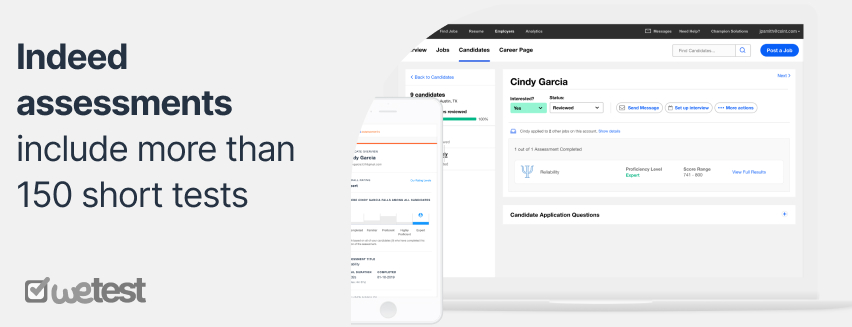
Indeed assessments include more than 150 short tests evaluating candidates’ skills. Candidates take this test based on the recruiter’s request to show the level of their skills mentioned in their resume.
Indeed assessment is a free tool that can help employers to find the best candidates for their job position. Employers can screen candidates for their most vital hard skills, such as sales and accounting, or soft skills, such as accountability and reliability.
Indeed Assessments include different ready-to-use online testing tools to help employers find the best candidates and decide who to contact for the interview.
Indeed assessments have different ready-to-use skills tests, which can help recruiters to decide which candidate to choose and reach out to for an interview.
Indeed assessment tests can reduce an employer’s time for finding the best candidates by 12%on average.
Candidates can take the test in about 10 minutes by answering multiple-choice questions, and the length and complexity of skills depend on the industry or topic. This process helps recruiters to evaluate a candidate’s skills without bias.
Some questions analyze the candidate’s knowledge and identify how a candidate will react in a situation that might happen in an actual job situation. All in all, applicants should provide the best answer to the question.
Many professional psychologists designed the Indeed assessment test using test simulations, skill tests, audio interviews, work samples, and many more. This test narrows employers’ choices effectively so they can choose the best candidate quickly.
How to add assessments to your job post?
When an employer posts a job on Indeed, the customized screening page will show relevant test suggestions from a library with more than 200 tests.
When an assessment is added to a job post, it can help employers to understand which candidates are interested in the job or want to showcase their skills before the interview.
When employers choose an assessment and agree with Indeed assessment terms, Indeed will send the test on their behalf to all candidates. Also, employers can manually send the test to candidates that they pick.
If employers want to add the assessment to the job after posting it, they can go to the employer Dashboard tab, choose “Edit job” under the job title they want to add an assessment to, and then click on the left side of the page.
Then, employers can choose relevant tests. We suggest recruiters choose three skills tests related to the job description and title. Moreover, employers can click on the “view more” topic to see more options.
Employers can still send candidates the skill test if they have already applied for the job. They must check the “View Candidate page,” choose more actions and then send the assessment.
Candidates can take the test without any invitation. They can just take the test and share the results on their profile. The result will be added to their resume automatically, and employers can see the list of scores.
If employers want to find candidates who have already done the test, they can search Indeed’s resume database and invite those candidates to apply for the job.
This method can help employers to choose qualified candidates. After applying for the job, candidates will receive an invitation email to do the test.
How to Choose the Right Tests for Each Job
When you pick assessments from the library, start with your job description. Identify the two or three skills that truly drive success in the role, for example, basic Excel and attention to detail for an operations assistant, or customer communication and conflict resolution for a support agent.
Select tests that measure those skills directly, rather than every possible ability a candidate might have. This keeps the assessment set focused, short, and closely aligned with the job, making the results more useful and the process more manageable for applicants.
From what hiring teams often see in practice, choosing fewer but very relevant tests leads to better results than trying to measure everything at once, because candidates stay engaged and you get clearer signals about the skills that actually matter for the job.
When to Use Indeed Assessments in Your Hiring Process
Indeed Assessments work best when they are tied to specific, job‑related skills instead of used as a generic filter.
For entry‑level or high‑volume roles, adding one or two short skills tests at the application stage can help you quickly sort candidates by their ability to perform core tasks.
For more specialized positions, you might use assessments after an initial resume screen, so only serious and relevant candidates are asked to complete more detailed tests.
Thinking about where assessments fit into your process for each role prevents unnecessary testing and keeps the candidate experience positive.
How to evaluate and select candidates in Indeed?

Indeed assessment scores have different categories from high to low, including Expert, High, Proficient, Familiar, and Completed. If candidates receive a “Completed” score, they have failed the test.
The “familiar” score means that the candidate had some understanding but was not experienced enough in the skill. Candidates must get a proficient score to prove they have enough professional skills.
Candidates will receive the test results by email or checking the “Candidate Dashboard” section. Because all candidates take the same test for the job position, employers can analyze their performance without bias.
The assessment test score will evaluate the candidate’s ability for the job position. Besides test scores, employers should review applicants’ cover letters, resumes, and interviews to gain a clear insight into their skills and abilities.
How to Use Scores Alongside Resumes and Interviews
Assessment scores should guide your decisions, not replace them. For example, you might decide that candidates scoring “Proficient” or higher on a key skills test move to the interview stage, while those at “Familiar” are only advanced if their resumes show strong, related experience.
During interviews, you can use the test results to ask follow‑up questions about how candidates would apply their skills in real situations. This way, assessments provide an objective baseline, and resumes and interviews add the full context you need to make a fair, confident hiring decision.
In my experience, hiring decisions are strongest when assessment scores and real stories from a candidate’s past work point in the same direction, rather than when one is used to ignore the other.
How to Use Score Levels for Different Roles
Indeed assessment scores range from Expert and High down to Proficient, Familiar, and Completed, but what counts as “good enough” depends on the job.
For roles with straightforward tasks or where you plan to train new hires, you might treat “Proficient” as your ideal target and consider “Familiar” candidates if their resume and interview show strong potential.
For highly specialized or safety‑sensitive positions, you may decide that only candidates scoring at the “High” or “Expert” level on key skills move forward.
Defining your expected score range for each role before you review results helps you stay consistent and fair across candidates, instead of making cutoff decisions on the fly.
The advantages of using Indeed assessment
The classic hiring process is unproductive because the employer’s primary focus is on resumes that only show a part of the applicant’s abilities. Therefore, recruiters can’t choose the best candidate because they might get involved with unintended bias.
Employers should understand the level of candidates’ skills and abilities from different aspects and decide to hire them. Below are some benefits of using the Indeed assessment test for recruiters.
- Quicker access to qualified candidates
- Boost objectivity and accuracy
- Empower employer’s evaluation
- The availability of different candidate assessment tools for screening.
- Motivating candidates to apply
- Identify qualified candidates.
- ٍProviding a powerful recommendation engine
- Increase productivity with Applicant Tracking System.
Making Assessments Fair and Candidate-Friendly
Candidates are more likely to complete assessments when they understand why they are being tested and how the results will be used.
Clearly explaining in your job post that the skills tests are job‑related and help you compare all applicants on equal footing can increase completion rates.
Keeping the number of tests reasonable, choosing only those that directly match the role, and avoiding questions that are unrelated to the job also helps maintain trust and reduces the risk that candidates feel they are being judged unfairly.
When to Supplement Indeed Assessments With Other Tools
Indeed Assessments are convenient for testing common skills and screening large numbers of applicants quickly.
For highly specialized roles, or where you need deeper simulation of on‑the‑job work, you may still want to add other evaluation methods such as technical take‑home tasks, portfolio reviews, or structured interviews.
Viewing Indeed Assessments as one part of a broader evaluation process helps you get the benefits of standardized testing without relying on a single tool for every decision.
Current Status and Limitations of Indeed Assessments
Indeed Assessments are a useful way to test candidates on common skills, but they are not available in every employer account and the feature has changed over time.
Some employers can still add skills tests directly to job postings or send them from the Candidates tab, while others may see fewer options or no assessment tools at all.
It is a good idea to check which assessment features you have in your dashboard and not rely on them as your only evaluation method.
For roles that require deeper or more specialized testing, you may still want to supplement Indeed Assessments with other tools, such as take‑home exercises, technical challenges, or structured interviews, so you keep control of your hiring process even if platform features change.
Conclusion
Indeed assessment test is a free tool that helps employers screen candidates based on their skills, abilities, personality, and aptitude for a particular job position. Recruiters can add these tests to their job postings and make easier, faster, and wise hiring decisions.
Job applicants have completed more than 70 million Indeed assessment skills tests worldwide, and more than 600,000 employers used this feature.
By using Indeed assessment tests, employers will better understand applicants’ skills before inviting them to the next step, and they can avoid rejecting candidates based on their resumes.
In many cases, the candidate’s education might not be related to the job position, but they have the required knowledge and experience. Therefore, many employers might miss many candidates if they only rely on their resumes.
Indeed assessment tools incorporate testing into the application process; therefore, employers and job applicants can benefit from this feature. These tests provide a simple and easy way for candidates to showcase their skills and help employers to make a choice they won’t regret.
FAQs
Do job seekers have to pay to take Indeed Assessments?
No. Indeed Assessments are free for candidates when employers send them as part of the hiring process.
Can I still use Indeed Assessments for all my job postings?
Availability can vary by account and region, so some employers may see assessment options on certain jobs while others may not.
How long does an Indeed Assessment usually take to complete?
Most individual skills tests take about 10–15 minutes, though total time depends on how many tests you assign.
Can candidates retake an Indeed Assessment to improve their score?
In many cases, candidates can retake an assessment after a set period or when invited for a new role, but retake rules may differ by test.
Should I reject candidates only because of a low assessment score?
No. Assessment results are one data point; it’s better to consider scores together with resumes, experience, and interview performance before deciding.
Hire the best candidates
with Wetest.
Create pre-employment assessments in minutes to screen candidates, save time, and hire the best talent.
Try for free